Bridge · Player
Use the bridge as a player
Plug a USB DAC into the Linux box that runs your bridge, and the bridge plays your library to it. 1-bit on your iPhone picks the music. The audio goes from the bridge's disk to the DAC, never through the phone.
How it plays
The phone picks. The bridge plays.
Since version 0.2.2 the bridge has a player of its own. It reads each file from its own library and sends it to the DAC plugged into its box, at the file's own rate and bit depth.
- The box's disk Your files FLAC · WAV · AIFF · ALAC, in this bridge's own library read by the bridge →
- 1-bit bridge · Linux Its own player decodes to PCM at the file's own rate and bit depth · no resampling, no volume, no mixing USB, opened by the player alone →
- Your USB DAC The file's samples or the track is refused, never converted · DSD comes in a later version
1-bit on your iPhone sends the queue and the controls over your home network (OpenHome) · the audio never passes through the phone
At a glance
- You need bridge 0.2.2 on a 64-bit Linux box, a USB DAC plugged into that box, and 1-bit 2.2 on your iPhone or iPad.
- Set it up on the admin console's Player page: choose the DAC, turn the player on, let the 1-bit app cast to it, and restart the bridge.
- In 1-bit, choose it in the output picker. It plays this bridge's own FLAC, WAV, AIFF and ALAC files, with no resampling and no volume control.
- DSD doesn't play on it yet: a DSD track is refused, never converted.
- It works on your home network only. The player is off until you turn it on.
What you need
- A 64-bit Linux box running the bridge 0.2.2 or later (amd64 or arm64): a Raspberry Pi with Raspberry Pi OS, moOde or Volumio, or a Debian or Ubuntu machine. The player doesn't run on macOS or Windows, or on a bridge in public mode. Install the bridge natively on the box the DAC is plugged into: the Docker guide doesn't cover the player.
- A USB DAC plugged into that box. In 0.2.2 the player takes USB DACs only: an HDMI output or an I2S DAC board can't be chosen.
- Your music in that bridge's library. The player plays only the bridge's own files.
- 1-bit 2.2 or later on an iPhone or iPad, paired with the bridge, on the same home network as the box. 1-bit 2.1 and earlier can't cast to it.
-
Install or update the bridge
On the box, as the user the bridge runs as (not root), run the one-line installer. It installs the bridge, or upgrades a bridge already set up as your user's service:
curl -fsSL https://1-bit.app/install.sh | shAlready running the bridge another way?
bridge updateupgrades it. Then check the version: it should say v0.2.2 or later.bridge versionThe setup walkthrough covers the rest of a first install, pairing your phone included.
-
Plug in the DAC and free it
Plug the DAC into the box and switch it on. The player opens the DAC on its own, and it never takes it from another program. So if Volumio, moOde or MPD plays to that DAC, stop playback there before you cast.
The user the bridge runs as must be allowed to open the DAC. Check that it is in the
audiogroup:id -nGIf
audioisn't in the list, add it and reboot, so the bridge's service starts with it:sudo usermod -aG audio "$USER" sudo reboot -
Open the console's Player page
The admin console answers only on the box itself. From your computer, open an SSH tunnel whose local port is the console's own (7789 by default), then open
http://127.0.0.1:7789/in your browser:ssh -L 7789:127.0.0.1:7789 you@the-boxIn the sidebar, under Server, choose Player.
-
Choose the DAC
Under Choose the DAC, press Find DACs. Pick your DAC in the list, choose how to bind it under Bind it, and press Use this DAC. The page suggests a binding:
- By serial follows this DAC to any USB port.
- By model takes the one DAC of that model on the box.
- By port takes whatever DAC is plugged into that port.
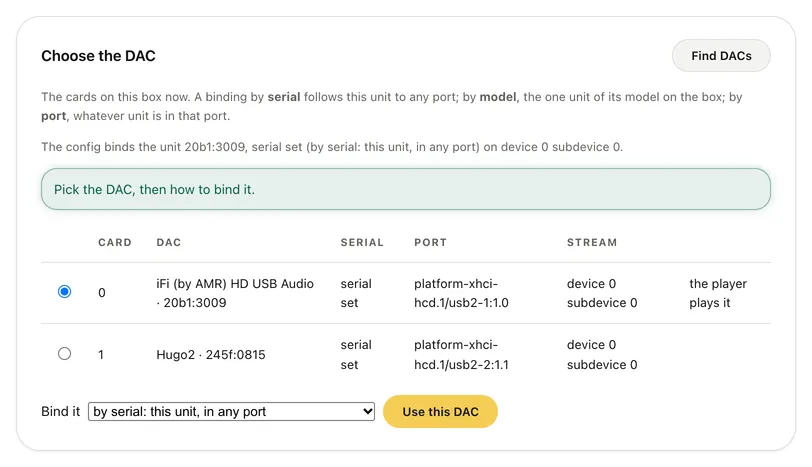
Choose the DAC, after Find DACs. The console shows at most the last four characters of a DAC's serial; here both DACs read “serial set”. Prefer a terminal? List the box's sound cards, then, with the bridge stopped, bind yours by its card number (the N of
/proc/asound/cardN) and a binding:serial,uniqueModelorport.bridge output dac bridge stop bridge output dac bind <card> --binding serial bridge startThe other switches are on the Player page.
-
Turn the player on
Under Turn the player on or off, press Turn on.
-
Let the 1-bit app cast to it
In the same panel, under Let the 1-bit app cast to this player, press Turn on. Once the bridge restarts (the next step), it announces the player on your home network as an OpenHome renderer named “1-bit Bridge Player”, unless you give it a name (below).
Like the bridge's DLNA server, it asks for no sign-in: any device on your home network can find it and play this bridge's tracks on it. It uses UDP port 1900 and TCP port 7792, and it refuses connections from other networks, Tailscale included.
To give it a name of your own, such as the room it's in, add a
roomline to theoutputblock that the page wrote tobridge.yaml(~/.config/1-bit-bridge/bridge.yamlon a Linux install), up to 64 characters:output: player: room: Living room -
Restart the bridge
The bridge sets up its player when it starts, so the page lists your changes under Waiting for a restart. Press Restart now, or run this on the box:
bridge restartA restart stops anything the player is playing. Then look at Status: Player should read “On, stopped. Its OpenHome source is on the LAN.”, and the DAC row should say your DAC is available.
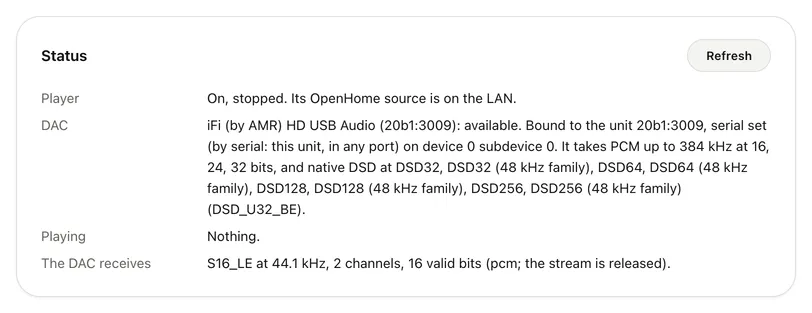
Status, after a restart. The DAC receives shows the format the player last opened the DAC with: here a 16-bit, 44.1 kHz track. The player has since let the DAC go.
Play from 1-bit
- Check that Players on bridge boxes is on, in Settings → Audio → Network players. It's on by default. With it on, 1-bit asks your bridge which players run on its box, so it recognizes the bridge's own player.
- Play an album or a playlist from this bridge. Every track in the queue has to be one the player can play: this bridge's own FLAC, WAV, AIFF or ALAC files.
- In Now Playing, tap Audio Output (the speaker). Under DLNA renderers, the bridge's player shows by its name, with “1-bit Bridge · Own library · Fixed output · Unverified” under it. Tap it.
- 1-bit checks the whole queue first. If a track can't play there, it stays on your current output and says which track and why, for example “1-bit Bridge Player wasn't selected. 1-bit Bridge Player plays only tracks from its bridge's own library, and … comes from another source.”
- To play on the phone again, open the output picker and tap the first row under This iPhone.
While it plays
- On iPhone, the label along the bottom edge of the cover in Now Playing names the player, as in “ON 1-BIT BRIDGE PLAYER”. Tap it to open Signal Path.
- Play, pause, skip and choose tracks as usual. Tracks in the same format play back to back with no gap; when the format changes, the player reopens the DAC between tracks, which leaves a short gap.
- Seeking within a track isn't in this version: dragging the progress bar leaves the player where it was.
- The volume is fixed (“Fixed output”): the player never lowers a sample, and 1-bit shows no volume slider for it. Set the level on your DAC or amplifier, and start low.
- After 30 seconds paused, the player lets go of the DAC, and it takes it back when you play again.
- 1-bit won't add tracks the player can't play to the queue, and says why.
What Signal Path shows
Open Signal Path from Now Playing. For a PCM track it shows the bridge the file comes from, the file's format, and “Decode and DAC stage unobserved”. 1-bit tells the player which file to play, but it can't see the decode or the DAC itself, so it marks this player Unverified.
The bridge can. The Status panel's The DAC receives row shows the format the player opened
the DAC with. For a reading straight from the Linux kernel, run bridge output dac on the box while
a track plays: for an open stream, it shows what the DAC receives.
What plays
The player plays the file's own samples, or refuses the file. It doesn't resample, convert, mix or change the volume, so the DAC receives the PCM the file holds, at its own rate and bit depth.
- Plays: FLAC, WAV, AIFF and ALAC (in
.m4a), in stereo, as 16, 24 or 32-bit integer PCM, at any rate the DAC takes. - Refused: MP3, AAC and other lossy files; floating-point WAV or AIFF; 20-bit files; 32-bit FLAC (32-bit WAV, AIFF and ALAC play); mono and multichannel files; and anything the DAC can't take at the file's own rate and bit depth.
- Only this bridge's files: not tracks from an SMB share, from your phone, from another bridge, or from a UPnP server that this bridge passes through.
1-bit catches tracks from other sources, lossy files and DSD before it switches. The bridge skips any other file it can't play when it gets to it, goes on to the next, and writes the reason to its log.
DSD: not yet
In 0.2.2 the player is PCM only. A DSD track (DSF, DFF or a track from an SACD image) is refused, never converted to PCM: 1-bit tells you before it switches, for example “… is a DSD file 1-bit Bridge Player can't play.”
The player has DSD code in it, but it plays DSD only to a DAC its owner has qualified by listening, and no command or page in 0.2.2 makes that approval. The Player page's Transports on this DAC table shows where it stands: PCM plays; DoP and native DSD don't, even when the DAC takes them.
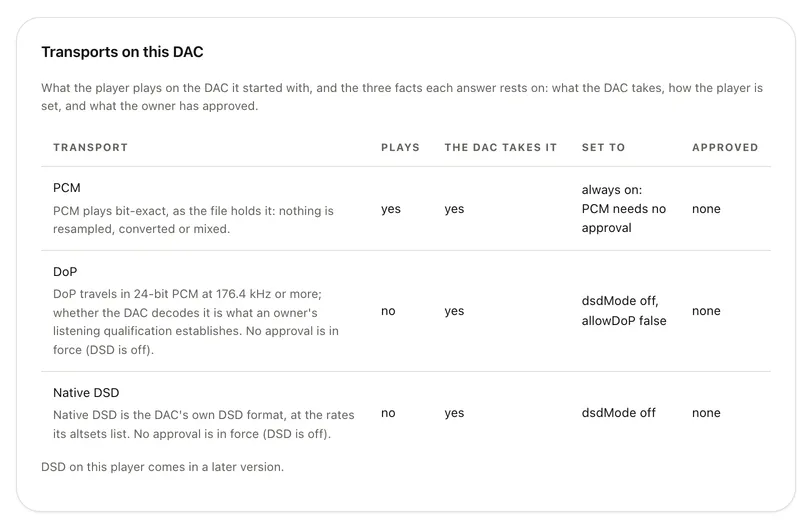
For DSD today, play it on your iPhone to a USB DAC, or cast it to another player on your network that takes DSD. DSD on the bridge's own player comes in a later version.
Troubleshooting
Two things help with most problems: the Status panel on the Player page, and the bridge's log,
which bridge logs -f follows on the box.
The player isn't in 1-bit's output picker
- On the Player page, Status should read “On, …” and “Its OpenHome source is on the LAN.” If changes are listed under Waiting for a restart, restart the bridge.
- Your iPhone has to be on the same home network as the box. The player doesn't answer over Tailscale or from outside your home.
- 1-bit needs Local Network access: in iOS Settings → Privacy & Security → Local Network, turn on 1-bit.
- Refresh the picker's list with its ↻ button.
- If the row reads “OpenHome · Unverified” instead of “1-bit Bridge · …”, turn on Players on bridge boxes (Settings → Audio), and check that the bridge is paired and reachable in Sources.
1-bit says the player “wasn't selected”
Something in the queue can't play there, and the message names it: a track from another source, a lossy file, or DSD. Play an album from this bridge's own lossless files, then choose the player again.
1-bit says it doesn't know the bridge's address on your home network
1-bit learns the bridge's home-network address when it reaches the bridge there. Open Sources while your phone and the bridge are on the same network, then choose the player again.
The DAC is held by another program
Status adds “Its last play found the DAC held by another program.”, and the picker shows “DAC in use” under the player. Stop playback in Volumio, moOde, MPD or whatever else uses that DAC, then press play again. The bridge never stops another program.
Nothing plays, and the log says “the audio group owns it”
The user the bridge runs as may not open the DAC. Add it to the audio group and reboot (step 2).
Status says “Off. No DAC was bound when the bridge started.”
Status says “The DAC is not available (device_missing)”
The DAC the player is bound to isn't there: it's unplugged or switched off, or, with a binding by port, plugged into another port. Plug it back in. If it was playing, press play again: the player doesn't resume on its own. The picker shows “DAC not connected” meanwhile.
Status says the player plays nothing until the bridge restarts
The settings changed after the bridge started, for example another DAC was chosen. Restart the bridge (step 7).
A track is skipped
The bridge skipped a file it doesn't play, such as a 32-bit FLAC, a floating-point or 20-bit file, a mono file, or a rate the DAC can't take. Its log has a line “player: an entry was skipped” with the reason. See What plays.
The Player page says the player can't be changed here
The player runs on Linux only: on a Mac or a Windows PC the page says so and offers nothing else. On a bridge in public mode it says “Not available on public deployments”.
bridge doctor says “the player will not start”
The player keeps its identity and its queue in the bridge's data directory, which has to keep what is written to it through a reboot. On a system that keeps the disk read-only and writes to memory, such as Raspberry Pi OS with its overlay file system turned on, put the data directory (dataDir in bridge.yaml) on storage that keeps it.
The player went off after I edited bridge.yaml
A value the bridge can't read in the output.player block turns the player off, and leaves the rest of the bridge running. The log says “output.player: the player is off”, with the reason. Fix the line, or use the Player page, which writes the block for you, and restart.
1-bit 2.1 no longer lists the box's MPD player
While casting is on, 1-bit 2.1 and earlier stop listing this box's own MPD player. Update to 1-bit 2.2, which lists both.
Still stuck? The bridge troubleshooting page covers the rest, and GitHub issues is where to report a bug. What the player opens and logs is in the bridge privacy policy.
Related
- Features → the bridge's own player, and the box's own MPD player.
- The latest bridge release on GitHub.