What it is
1-bit bridge is a small Go server you run on a Mac, Windows PC, Linux box, or Raspberry Pi alongside your music library. It serves the iOS app over HTTPS instead of SMB — same files, same bit-exact audio, but a transport designed for the app rather than a decades-old file-sharing protocol.
It's free to self-host, and the full source is public under the FSL-1.1-MIT license — every release automatically becomes MIT-licensed two years after it ships. The code, binaries, wire protocol, and release notes live on GitHub; everything you need to install, pair, and run it is documented right here.
The setup walkthrough takes you from a blank machine to a paired iPhone in about ten minutes. Hit a snag? The troubleshooting page is symptom-to-fix.
Why use it instead of SMB
- Faster. A pre-indexed library manifest replaces the iOS app's two-phase SMB scan. The first sync finishes in seconds, not minutes.
- Reachable remotely. SMB is a LAN protocol. The bridge speaks HTTP/2 over TLS — Tailscale, WireGuard, or any direct route works without extra plumbing.
- Easier to set up. Run the installer, approve the device on the admin console, you're paired. No share permissions, no Samba quirks.
- Same audio path. The bridge ships bytes; the iOS app still owns DSD, DoP, gapless, and everything else. No server-side transcoding, ever.
What's new in 0.2.1
A hardening release (1 October 2026), much of it from an external security review of the bridge and the app. The iOS wire protocol stays at v1 and every change is additive, so no re-pairing and no app update are required, and the bit-exact audio path is untouched:
- Pairing links carry a one-time code. The console's QR code and link used to carry the device's long-lived token, so anyone who saw the link held the credential. The app now trades a single-use, ten-minute code for a fresh token, and the link stops working at that moment.
- Sign every console session out from the Devices page, or with
bridge admin sign-out-everywhere; a password reset signs everyone out by default. - Quieter logs. They keep no client address, name library files by their library-relative path, and never print a credential written into a configured URL.
- More of your tags, read right. A FLAC or Ogg date the tag reader can't parse no longer reaches your devices as year 1, every PCM container reports its duration, M4A keeps its genre and freeform tags, and the compilation flag reaches the app (1-bit 2.1 files a flagged album that has no album artist under Various Artists). The first scan after the update re-reads your library once.
- DSD renditions keep an album's balance. The level boost that brings DSD up to PCM level is decided per album, so its tracks keep the differences they were mastered with, and renditions survive moving the library to a new host or path.
- A restart from the console relaunches the bridge on macOS and Windows. Updating
from 0.2.0 through the console on those two? Run
bridge restartonce afterwards.
The full list is in the 0.2.1 release notes.
What's new in 0.2.0
Since 0.1.9. The iOS wire protocol stays at v1 — everything below is additive, so older app builds keep working unchanged, no re-pairing and no app update are required, and the bit-exact audio path is untouched:
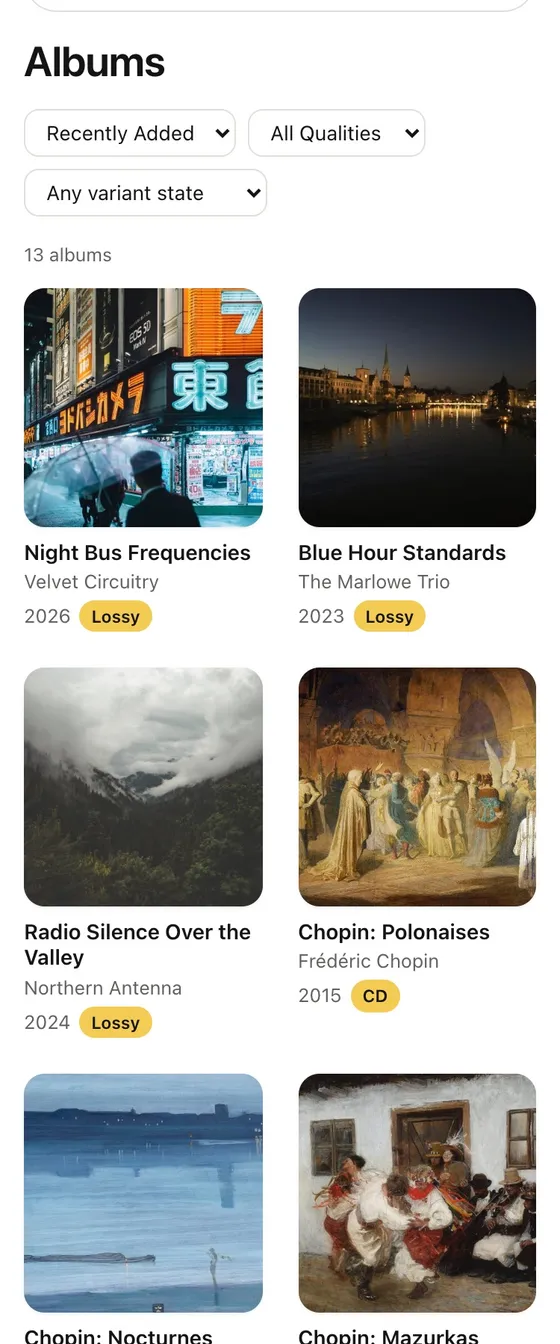
- The console is now a player. Albums with an A–Z rail, artists with portraits, genres, composers, playlists and Smart Mixes as real player pages, and a now-playing bar that survives navigation to the operator pages — the same web player on your laptop as on your phone. The Albums page opens at once: its coverage badges come from a snapshot that refreshes behind the request rather than from two library scans in front of it.
- Add music from the browser. Chunked, resumable, content-verified uploads — files or whole folders — behind their own switch, and a separate delete-as-trash switch that moves files into a dated trash folder inside your library instead of unlinking them. The only way to fill a library on a host you have no shell on.
- DSD → PCM renditions. For a wired DAC that can't take a DSD rate, the bridge renders a DSD source offline into a faithful 176.4 / 192 kHz 24-bit tier and a compact tier, and serves them beside the untouched original. Measured, not assumed: a −116.8 dB decimation stopband, a +0.00 dB alias differential on the faithful tier, a rendition landing at −0.97 dBTP against its −1.0 target — and the measurements run in CI on every change.
- Lyrics, one document per track. The bridge extracts,
stores and serves lyrics from ID3, Vorbis and MP4 tags and from
.lrc/.ttml/.txtsidecars, in the order the app already uses, and an opt-in network tier fills the gaps from a self-hosted Atlas relaying LRCLIB. A transcript with one time cue is plain text, not a synced stub — the same rule the app applies. - Covers reach every screen. DLNA renderers finally get album art from the
LAN listener; SACD ISO images expand into virtual tracks; ALAC
can be upscaled;
GET /v1/searchputs the library's search index on the wire; artist portraits are content-keyed and cache forever. - For operators. One-time console login
links that survive a phone-to-laptop hand-off, a hosted-tenant posture that hides and
refuses what a tenant doesn't own, an export of everything a
person made, database compaction and history retention windows, per-route rate limits,
/healthz+/readyz, and settings that apply on save — with the response saying, per field, what actually took effect. - Under the hood. 175 pull requests — four review sweeps, 39 fuzz targets across ten packages fuzzed nightly, the Windows and macOS test legs promoted into the merge gate — and the first release under FSL-1.1-MIT: v0.1.9 and earlier stay MIT, and each release converts to MIT two years after it ships. Self-hosting is free and the source is public, as before.
Full release notes and upgrade guidance: github.com/acoseac/1-bit-bridge/releases.
Bit-exact, by design
The bridge never decodes, resamples, or transcodes the source files. It serves the bytes the iOS app asks for — DSF, DFF, FLAC, ALAC, WAV, AIFF, MP3, AAC — and the iOS app does the rest. The full DSD pre-cache that protects DoP marker alignment still applies; the bridge just gets the bytes there faster. Optional upscaled variants are generated alongside the originals, never in place of them.