1-bit: No mixer. No resampling. No hidden processing.
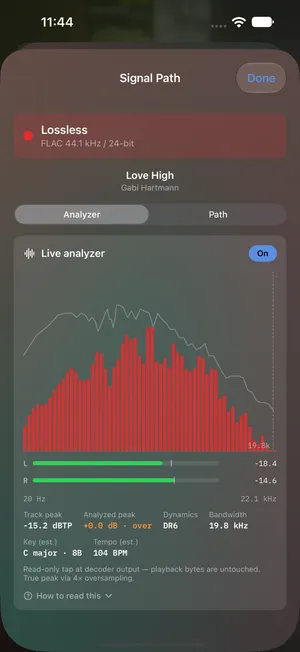
A free, private music player for iPhone and iPad that plays your own files bit-exact — from a NAS, a UPnP/DLNA media server, a bridge you run, a folder on the device, or 1-bit Cloud, a private library we host for you. Bit-exact DSD over DoP to a USB DAC, native-rate PCM, synced lyrics, and a Signal Path that shows exactly what reached your DAC.
iPhone & iPad · version 2.1 on the App Store
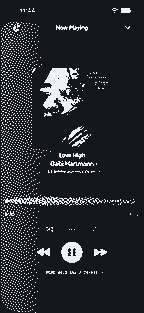
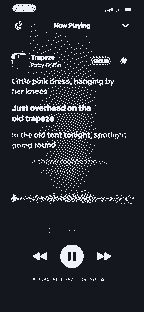
One bit at a time. A bar is a 1, a gap is a 0. A DSD64 file is 2.8 million of them a second, per channel.
Density is the music. Bars crowd together where the wave is high and thin out where it is low.
The line is the same bits after a low-pass filter. In principle, that is all a DAC has to do.
See it in action
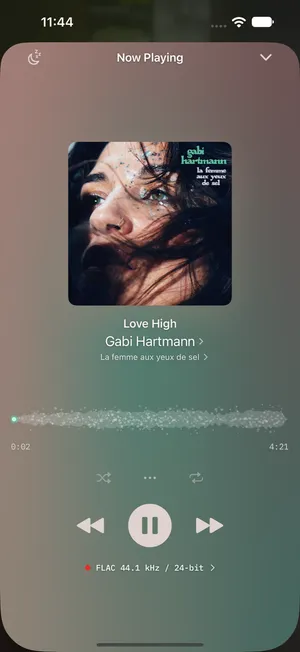
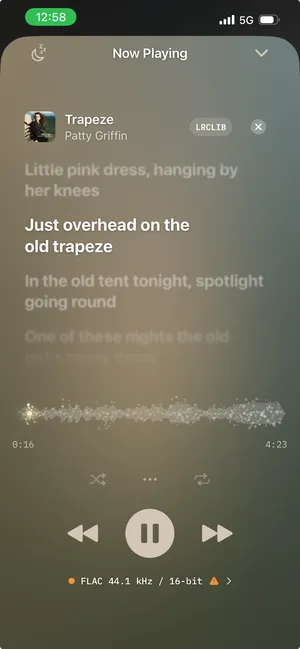
Built to be looked at, not just heard.
A real library browser with a full-screen Now Playing, per-track format badges, and a live sample-rate readout — so you always know exactly what's reaching your DAC.
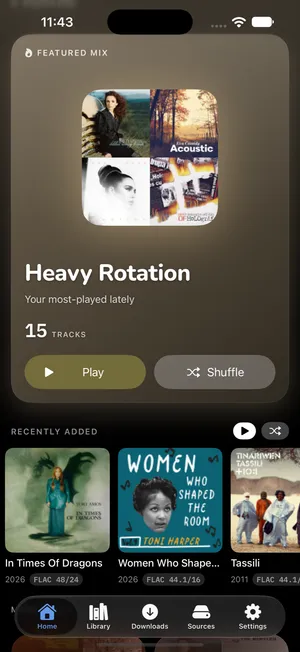
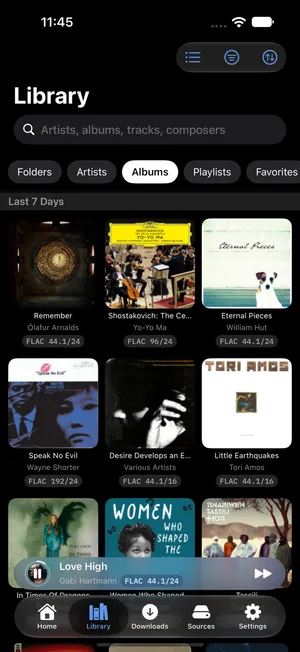
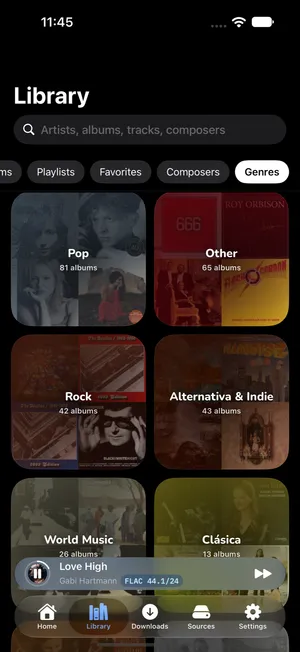
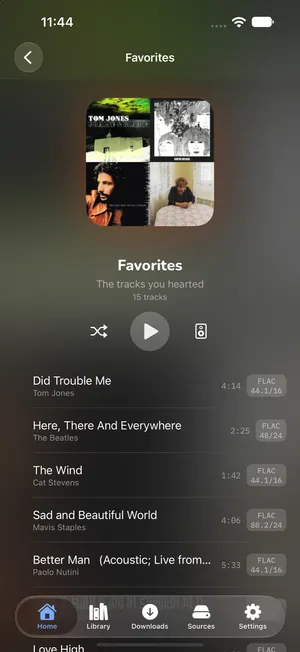
What it does
A real music player, not a file browser.
1-bit scans your library into albums, artists, and playlists, then plays it to your DAC the way it was recorded — no system mixer, no resampling, no hidden processing.
- Five sources, one library
- Play from an SMB share, a 1-bit bridge you run yourself, a UPnP/DLNA media server, a folder on the device, or 1-bit Cloud — all in one scanned library.
- Bit-exact DSD over DoP
- DSF and DFF wrapped in DoP straight to a USB DAC — DSD64, DSD128, DSD256 — never touched. No DAC in the path? It plays anyway, converted on the phone, and Signal Path says so.
- Native-rate PCM
- FLAC, ALAC, WAV, AIFF, MP3, and AAC at the file's own sample rate — up to whatever your DAC accepts.
- Gapless playback
- Seamless between tracks when the format matches — the DoP marker phase is preserved across boundaries.
- CarPlay and Siri
- Browse, search, and tap-to-play on a CarPlay head unit, with full Now Playing on the dash — and “play [album, artist, playlist or genre] on 1-bit” anywhere Siri listens.
- Remote control everywhere
- Now Playing, Lock Screen, Control Center, AirPods, and Apple Watch — transport that works where you do, on iOS 27's new Now Playing session.
The whole point
Bit-exact, end to end.
iOS has no first-party way to play DSD, and most apps quietly transcode it to 48 kHz PCM. 1-bit doesn't touch the bits — what audiophiles call bit-perfect, taken literally.
- Source Your files DSF · DFF · FLAC · ALAC · WAV · AIFF
- 1-bit · iOS Bytes in, DoP out no resample · no mixer · no transcode
- Your DAC The original 1-bit stream DSD64/128/256 · native-rate PCM
The same bits at every stage
Where your music lives
Five sources, one library.
- SMB share
- Point the app at your NAS or Mac File Sharing, scan, listen. Credentials live in the iOS Keychain.
- 1-bit bridge ↗
- Free, source-available companion server. Faster than SMB, reachable over Tailscale or WireGuard, side-steps the Samba edge cases.
- UPnP / DLNA server
- Browse and play straight from a NAS media server or a Chord 2Go's own library — no bridge in the path.
- On-device
- Point 1-bit at any folder on the device or an attached drive and it plays the files where they already are — no copying, no server.
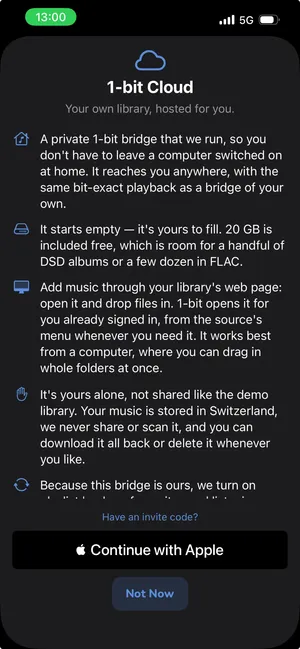
- 1-bit Cloud New in 2.0 Beta
- The same bridge, run by us. Sign in with Apple, add music from any computer through your library's web page, and it appears in Sources like any other bridge — with the same bit-exact playback, from anywhere. 20 GB is included free. It is yours alone: stored in Switzerland, never shared or scanned, every file downloadable back bit-exact, and deletable in one step. Everything else in the app still works with no account at all. What it stores → Terms →
- Leaves the source as
- DSF · DSD64 · 2.8224 MHz · 1 bit
- Changed
- Nothing
1-bit · iOS
Bytes in, DoP out.
DSF and DFF files are read off your network or local storage, wrapped in DoP (DSD-over-PCM) frames, and handed straight to the USB audio endpoint. No system mixer, no resampling, no dithering. If your DAC reports DoP lock, you are hearing the original 1-bit stream.
DSD uses a full pre-cache by default so the marker stream can't stutter on network jitter. PCM goes direct: the hardware sample rate is renegotiated to match the file. The render thread is lock-free, with per-DAC PLL settling tuned for the trickier hardware.
No wired DAC in the path? DSD plays anyway — converted to PCM on the phone — and the conversion is written on the screen: a converter stage in Signal Path, a card naming the reason, never a silent downgrade. Set it to Never and the app refuses, the way it used to.
Going through a 1-bit bridge? TLS fingerprint pinning means only the bridge you paired with can serve audio to your phone — no public CA, no MITM window, and no transcoding on the wire.
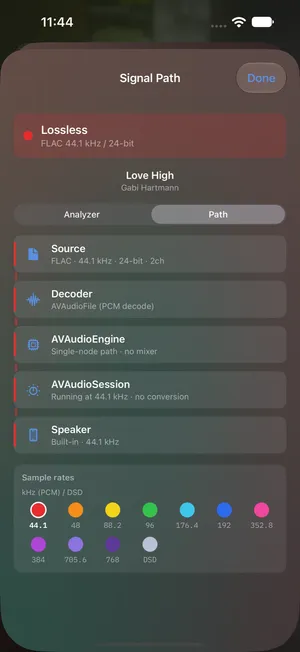
- In
- DSD64 · 2.8224 MHz · 1 bit
- Out
- DoP · 176.4 kHz · 24-bit frames
- Changed
- Nothing
Requirements
What you need.
- iOS 26.1 or later
- iPhone or iPad.
- At least one source
- An SMB share (Synology, QNAP, TrueNAS, macOS, Samba), a 1-bit bridge, a UPnP/DLNA media server, a folder of music on the device itself, or a 1-bit Cloud library. No server yet? Add the read-only demo library in one tap.
- For bit-exact DSD, a USB DAC with DoP
- USB-C or a Lightning-to-USB adapter. Everything else — AirPods, AirPlay, CarPlay, the built-in speaker — plays PCM at native rate and DSD converted, labelled as such.
Works with your DAC
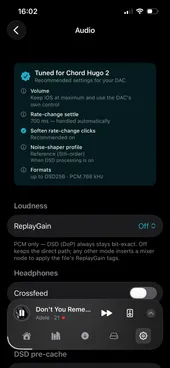
Connect any DoP-capable USB DAC — Chord, iFi, FiiO, Topping, Mytek and more — and 1-bit sends DSD straight to it, up to DSD256. Plug in a profiled one and 1-bit shows you the settings it was tuned for. Not on the list? Profile my DAC, on the DACs page in Settings, measures it and drafts the profile for you to send in.
See DAC compatibility →- In
- DoP · 176.4 kHz · 24-bit frames
- Unwrapped
- DSD64 · 2.8224 MHz · 1 bit
- Changed
- Nothing

New in 2.1
Little Giant More than its number suggests.
Codename “Little Giant”. Big files that start while they download, more DSD choices, Library lists sorted and laid out your way, an Artists list without the compilation clutter, a page of their own for your DACs, and a tab bar that makes room while you scroll.
- Big files start sooner. Large FLAC, WAV and AIFF files can start playing while they download, instead of waiting for the whole file. Turn it on in Settings → Audio.
- More DSD choices. Set DSD conversion to Always, or play DSD as PCM on just the one DAC that needs it. The conversion level now goes from +6 down to 0 dB, one step at a time, for recordings that would clip at +6.
- Your library, your order. Choose how each list is sorted and laid out in Settings → Library → Browsing. Artist pages now show the newest albums first, and sorting albums by year adds a year index along the edge.
- A tidier Artists list. Artists who only appear on compilations no longer crowd the Artists list; you can bring them back in Settings → Library → Compilations.
- A home for your DACs. DACs have their own page in Settings, one row per DAC, with Profile my DAC right there. Plug in a DAC the app doesn't know yet and the Audio page invites you to profile it.
- iFi DACs, thanks to Axel. 1-bit now recognises iFi USB DACs, thanks to the profile Axel Arenas sent in with Profile my DAC.
- More room to scroll. The tab bar shrinks while you scroll, with the mini player beside it, and comes back when you scroll up.
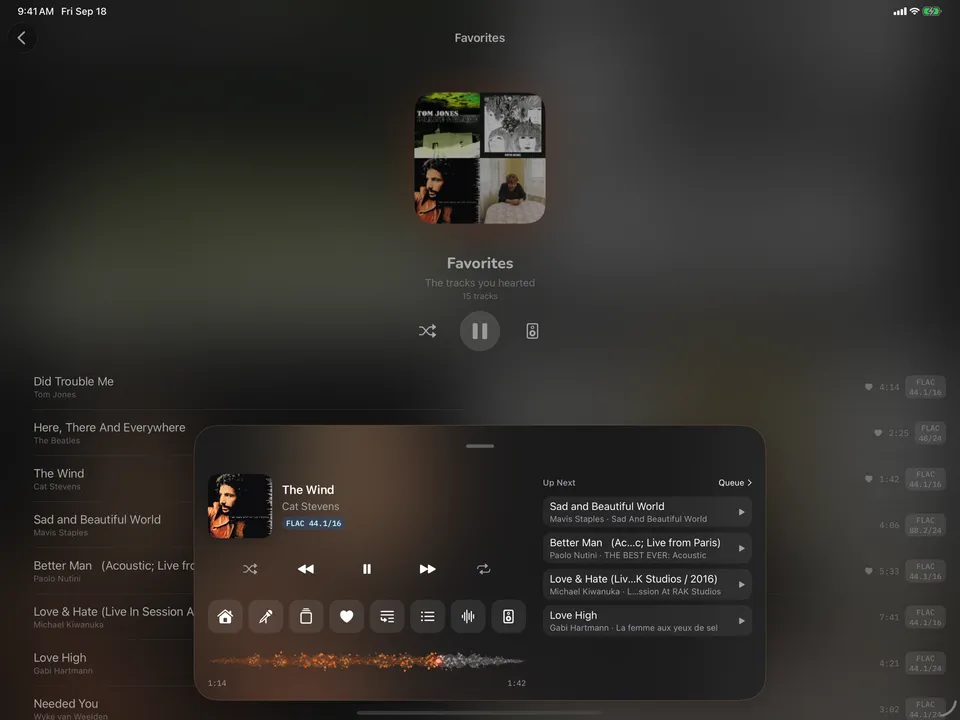
iPad
The floating player, on the big screen.
On iPad the player becomes a single bar with the scrubber inline, and the expanded deck gains an Up Next column beside the transport. The whole library — mixes, favorites, the analyzer, Signal Path — lays out for the width it has.
Need a hand?
Meet BitFixer — bridge help, on tap.
A built-in AI that knows the 1-bit docs and the bridge inside out. Ask what the bridge is, why it beats SMB, or get a step-by-step for installing it — on your Mac, PC, Linux box, or NAS. Hit an error? Paste a screenshot and it'll help you read it.
Privacy
Nothing to collect.
- No account unless you choose 1-bit Cloud. No analytics, no ads, no tracking.
- SMB credentials and bridge tokens stay in the iOS Keychain on your device.
- Zero personal data collected by default — GDPR, Swiss FADP, and CCPA compliant by construction.
- Read the full privacy policy →
Why is it free?
No telemetry play — there's nothing to monetize. The app ships no analytics SDKs and collects nothing by default; this website uses only Vercel's cookieless visit counts plus a tap counter on the download buttons (no cookies, no profiles, nothing sold or shared). The companion bridge is free to self-host, with its source public on GitHub, and 1-bit Cloud gives you 20 GB of the same thing for nothing. 1-bit is a personal project — I built it because nothing on iOS played my own library bit-perfect to my DAC, and I share it free.
Free on the App Store
Bring your library to your DAC.
No account unless you choose the cloud, no subscription, no catch. Setup and FAQ live on the support page, or email support@1-bit.app.

Free · iOS 26.1+ · iPhone & iPad