1-bit sends DSD to any DoP-capable USB DAC over a plain USB cable. Here's how compatibility actually works, what to check before you buy, a model-by-model matrix — and the popular DACs that are PCM-only.
How compatibility works
1-bit plays DSD on iPhone by wrapping the unaltered 1-bit stream in
DoP (DSD-over-PCM) and sending it over USB. iOS uses a
class-compliant USB audio driver, so the rule is simple: if a DAC is
USB Audio Class 2 and its spec sheet says it accepts DoP (or
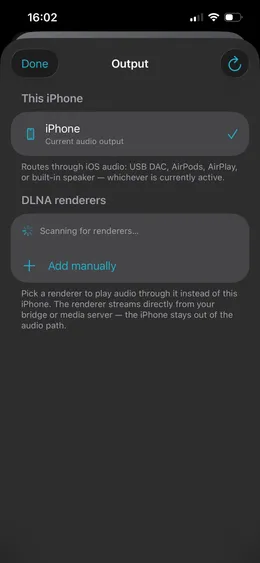
"DSD over USB"), it works with 1-bit — no vendor app, no driver. You pick it in the app's
Output screen and play.
The Output screen“This iPhone” routes to your connected USB DAC through iOS; DLNA renderers are the network alternative.
Before you buy — the DoP ceiling
On iPhone, DSD travels by DoP, which tops out at DSD256 — and
that's also 1-bit's ceiling. So every DAC below plays DSD64, DSD128, and DSD256
bit-exact. A handful can do DSD512, but only through a desktop (Windows/Mac)
driver that iOS doesn't have — so DSD512 isn't reachable on an iPhone by any app. Don't
pay extra for a DSD512 DAC expecting DSD512 on iOS.
Will my DAC work? A 30-second check
Does the spec sheet mention DoP or DSD over USB? If yes, 1-bit
will play DSD to it.
Is it class-compliant / USB Audio Class 2 (works with no vendor driver)? Almost
every modern USB DAC is.
Connection: a USB-C DAC plugs straight into a modern
iPhone/iPad; a USB-B or micro-USB desktop DAC needs the
matching cable; on a Lightning iPhone add Apple's Camera Adapter (ideally the
one with a power passthrough).
Power: bus-powered dongles are the easiest start; hungry desktop DACs want their
own power (or a powered adapter).
Rate: anything from DSD64 to DSD256 is golden. DSD512 is desktop-driver-only —
see above.
The compatibility matrix
Every row is checked against the manufacturer's published spec. The
On iPhone (DoP) column is the rate you'll actually get through 1-bit; where a DAC
can do more natively, the note says so. If a DAC you own isn't here, the 30-second check above is
the real test — these are just popular, confirmed starting points.
Chord Electronics
Model
Type
Connection
On iPhone (DoP)
Notes
Mojo 2
Portable
USB-C
DSD256
Native DSD256 — a clean DoP match.
Hugo 2
Portable
micro-USB
DSD256
DSD512 only via a desktop driver; use a micro-USB cable.
Qutest
Desktop
USB-B
DSD256
DSD512 is Windows-ASIO only; DSD256 over DoP.
iFi Audio
Model
Type
Connection
On iPhone (DoP)
Notes
hip-dac 3
Portable
USB-C
DSD256
Native DSD256.
GO bar
Dongle
USB-C
DSD256
Ships with a USB-C→Lightning cable too.
xDSD Gryphon
Portable
USB-C
DSD256
DSD512 native (desktop); DSD256 via DoP.
iDSD Diablo 2
Portable
USB-C
DSD256
DSD512 native (desktop); DSD256 via DoP.
FiiO
Model
Type
Connection
On iPhone (DoP)
Notes
KA17
Dongle
USB-C
DSD256
DSD512 native (desktop); DoP256 on iOS.
KA13
Dongle
USB-C
DSD256
Native DSD256.
KA11
Dongle
USB-C or Lightning
DSD256
Sold in separate USB-C and Lightning versions.
Q7
Portable
USB-C
DSD256
DSD512 native (desktop).
K7
Desktop
USB-B
DSD256
Native DSD256 (not 512, per FiiO).
K9 Pro / ESS
Desktop
USB-C
DSD256
Native DSD256 by design.
Topping
Model
Type
Connection
On iPhone (DoP)
Notes
E30 II
Desktop
USB-C
DSD256
DSD512 native (desktop); DoP256 on iOS.
D30 Pro
Desktop
USB-B
DSD256
Native DSD256.
Questyle
Model
Type
Connection
On iPhone (DoP)
Notes
M15
Dongle
USB-C
DSD256
Native DSD256.
M15C
Dongle
USB-C
DSD256
MFi-certified for iPhone.
Cayin
Model
Type
Connection
On iPhone (DoP)
Notes
RU6
Dongle
USB-C
DSD256
Discrete R-2R.
RU7
Dongle
USB-C
DSD256
1-bit discrete R-2R; detachable USB-C.
Astell&Kern
Model
Type
Connection
On iPhone (DoP)
Notes
AK HC2
Dongle
USB-C
DSD256
Lightning adapter included.
AK HC3
Dongle
USB-C
DSD256
Native DSD256.
AK HC4
Dongle
USB-C
DSD256
Native DSD256; UAC 1.0/2.0 switchable.
What about the AudioQuest DragonFly and Schiit? (PCM-only)
Two of the most-searched names belong here, not in the matrix — and it's worth being straight
about why. Some popular DACs don't accept DSD at all, by hardware or by design.
With 1-bit, your PCM library (FLAC, ALAC, WAV, AIFF…) still plays to them bit-exact
at native rate. But 1-bit will not transcode DSD to PCM to force a DSD file
through — that would defeat the whole point — so DSD tracks need a DoP-capable DAC from the matrix
above.
Model
Max PCM
DSD?
What this means with 1-bit
AudioQuest DragonFly (Black / Red / Cobalt)
24-bit / 96 kHz
No (no DoP)
Runs USB Audio Class 1 to stay driverless everywhere — which also caps it at 24/96. A fine little PCM DAC; PCM plays bit-exact up to 24/96, DSD won't.
Schiit Modi+, Modius, Bifrost 2
24-bit / 192 kHz
No (by design)
Effectively the whole Schiit DAC line is PCM-only — Schiit sells a separate box for DSD. PCM plays bit-exact; DSD needs a different DAC.
No USB DAC? Play to a network renderer
DSD doesn't have to leave the iPhone over USB. 1-bit can also hand a track to a
UPnP / DLNA renderer on your network — a Chord 2Go/2Yu, a streamer, or another
phone running the app — and the renderer fetches the audio straight from your
bridge or media server, keeping the iPhone out of the audio path entirely.
It's the second list on the Output screen above.
DAC not listed? Add it
This matrix grows from real reports. If you've run a DAC that isn't here, email
support@1-bit.app with:
Model (and exact variant)
Connection — USB-C or Lightning, and any adapter you needed
Max stable DoP rate you reached — DSD64, DSD128, or DSD256
Connect a DoP-capable USB DAC, point 1-bit at your files or the bridge, and play DSD untouched —
no resampling, no transcoding, no guessing what reaches the converter.