Sync & access
How the library is indexed, how you pair, and how you reach it from anywhere.
Library manifest
The bridge keeps a SQLite-backed index of your library — every track row carries the file path, sample rate, bits per sample, DSD flag, ReplayGain, and (when enrichment finds them) MusicBrainz IDs for release / artist. The iOS app fetches the whole library in one paginated GET /v1/manifest call, or a ?since=<mtime> delta when it already has a baseline.
This replaces the iOS app's two-phase SMB scan (walk + tag-extract). On a 50,000-track library over Tailscale, the difference is a few hundred milliseconds via the bridge versus several minutes via SMB.
Bytes are never transcoded. FLAC, ALAC, WAV, AIFF, MP3, AAC, DSF, DFF stream as-is. The iOS app still pre-caches the full .dsf / .dff before playback so the DAC's DoP lock isn't at risk.
Deletions travel on incremental syncs. The bridge keeps a journal of every track it removes — a file deleted on disk, a folder dropped from a library root, a copy retired by duplicate suppression — and a delta sync now carries those paths explicitly, so a removal reaches your phone on the next ordinary sync instead of waiting for a full re-scan. When the journal can't answer a very old cursor completely it says so rather than guessing, and the app falls back to a full sync for that round.
Right-sized artwork. Covers are scaled once, at scan time, instead of being cached at whatever size they arrived in — a meaningful cut in cache size on libraries full of 4 000 px scans. Artwork is served with an ETag, so a device that already holds a cover revalidates with a single conditional request and gets a 304 instead of the bytes.
What's extracted from tags. Beyond the basics, each Track can carry composer, conductor, work, originalYear, and bpm — the iOS app surfaces these as a "Conducted by X" header on conductor-consistent albums and a classical-metadata subtitle line in track rows. Multi-value ARTIST and ALBUMARTIST source tags (FLAC Vorbis, MP4 raw array) are preserved by the extractor and serialised as a ; -joined scalar string on the wire (artist / albumArtist) — the iOS app long-presses on a ; -separated credit to navigate to the specific featured artist. ALAC source bit depth is read from the MP4 alac config atom rather than the decoder default of 32-bit, so the iOS Now Playing chip shows the real depth ("ALAC 44.1 / 16"). DFF files now carry tags from the DIIN chunk; AIFF and WAV walk the container chunks for embedded ID3 or LIST/INFO.
Formats. FLAC, DSF, DFF (including DST-compressed DSDIFF), WAV, AIFF, MP3, AAC and ALAC are indexed with their real geometry; a SACD ISO image expands into one virtual track per title, served bit-exact from inside the image.
Search on the wire. The bridge keeps a full-text index of your library and serves it at GET /v1/search, so a paired app can search a large library without holding all of it — albums and artists first, then tracks. The admin console's own search uses the same index.
Duplicate suppression
One copy reaches the app. Real libraries accumulate the same track more than once — a re-rip left beside the original, an album uploaded twice into nested folders, a lossy copy kept next to the lossless one. The bridge now groups those copies and serves only the best one: the manifest, its totals, and the DLNA browse tree all describe the served set, so an album stops appearing twice on your phone. Nothing on disk is touched. Every file stays where it is, stays in the database, stays visible in the Inspector, and stays downloadable by path — this is a serving decision, not a clean-up tool.
DSD and PCM editions are never collapsed into each other. A hybrid SACD's DSD layer and its PCM sibling are different masters, and both keep serving; ranking happens strictly inside each domain — lossless over lossy, then bit depth, then sample rate, then size. Where both copies are FLAC the bridge compares the audio checksum the encoder wrote into each file, so it can say "these are bit-identical" or "these are different masters" as a fact rather than an inference — and a pair it has proven to be different audio is never suppressed.
A Duplicates page lists every group, the evidence behind it (identical audio, different audio, same format, different format, an upload accident, or inconclusive), and which copy is winning. Anything inconclusive is left alone. The policy is a single setting — duplicates.filter, one of highest-quality (the default), same-format, or off — and it applies live: flip it in Settings and the next pass re-evaluates without a restart.
Metadata matching
Enrichment fills in what your tags don't carry: the release and artist identifiers that unlock cover art, artist portraits, and — with Atlas — bios, descriptions, and booklets. It asks MusicBrainz for a match, then Cover Art Archive, Deezer, and the iTunes Search API for images.
How a match is decided was rebuilt, and the effect is measurable. On a 19 482-track library, the tracks left short of a cover, artist, or release identifier fell from 5,435 to 2,250: 87.7% of the missing artist identifiers and 43.2% of the missing release identifiers recovered. The old comparison was byte-literal, so a right single quote instead of an apostrophe (What's Up?), an en dash instead of a hyphen (Songs 2003–2013), an accent (Yael Naïm), or an ampersand where the catalogue spells out "and" was enough to throw away a match the server had already returned. Titles and names are now folded to a comparable form before they're compared, and the query itself retries in a widened ladder — with the album artist, and without an edition suffix — so Gold (Anniversary Edition) can still find Gold.
And when it still comes back short, it says why. The console's Enrichment panel breaks the misses down by reason — no search terms, no MusicBrainz match, an upstream error — and lists which tracks are missing which field, so "retry missing" is aimed rather than hopeful.
Acoustic fingerprinting (opt-in)
Better matching can't rescue a file whose tags say album: CD 01, artist: An Unknown Artist. For those, the bridge can identify the recording from the audio itself: it computes a Chromaprint acoustic fingerprint locally and asks AcoustID which recording it belongs to. On a 60-track sample of the ones the text path had given up on, it resolved 50.
It is deliberately conservative. A fingerprint identifies a recording, not a release — one recording appears on many albums precisely because they contain the same audio — so the bridge will never write an album identity or a cover from a fingerprint. It uses the recovered artist name to re-run the ordinary search and lets the normal matching decide, which bounds a wrong answer to a wrong portrait rather than a wrong album, cover, and folder grouping. If the file's own artist tag contradicts the fingerprint's answer, the tag wins and the match is dropped.
Off by default, and it needs two things you supply: the fpcalc binary (Chromaprint) on the host, and your own free AcoustID application key — the bridge ships no built-in key. Set fingerprint.enabled: true plus a key (or use BRIDGE_FINGERPRINT_ENABLED / ACOUSTID_API_KEY), or turn it on from the console's Jobs or Settings page. bridge doctor checks the toolchain, and bridge fingerprint <file> shows what a single file would resolve to without writing anything. See privacy → acoustic fingerprinting for exactly what leaves the host.
Atlas premium metadata (opt-in)
Standard enrichment (MusicBrainz / Cover Art Archive / Deezer / iTunes) gets you correct titles and a 500 px cover. Atlas is an optional layer on top, for when you want more: high-resolution album art (up to ~1080 px), artist biographies, and album descriptions, cached on the bridge and served back to every paired device.
The bridge never holds an Atlas credential of its own. By default the iOS app — which does hold the credential — fetches the metadata and pushes it to the bridge (POST /v1/atlas-ingest), which caches it in bridge.db and the artwork cache; on that path the bridge makes no outbound Atlas request. For large libraries you can additionally opt into bulk harvest (atlas.harvestEnabled): the app provisions a short-lived, device-attested credential and the bridge then fetches in bulk directly from the Atlas server — by default the reference instance at atlas.ars.md, or a self-hosted one you point it at — sending only your library's distinct artist and release MusicBrainz IDs. Covers carry a content version (artworkVersion) so the app refreshes a changed cover in place. Off by default; see privacy → Atlas metadata for the exact data flow.
PDF album booklets (opt-in)
When a release shipped with a digital booklet — the liner-notes PDF with sleeve essays, personnel, credits, and lyrics — the bridge caches it locally and serves it to your paired devices, so the artwork you already see gains the words that came with the record. Booklets can be large (10–64 MB); the iOS app downloads each one once and caches it.
Booklets ride the Atlas path, and inherit its posture. They're sourced through the same Atlas bulk-harvest the bridge uses for bios and descriptions, so the feature only lights up when Atlas harvest is enabled (atlas.enabled + atlas.harvestEnabled) — off by default, like the rest of Atlas. The bridge asks the Atlas service whether a given release has a booklet, keyed only by that release's MusicBrainz ID; it sends no file paths and no library inventory. A bridge without the feature simply advertises no booklets and older apps move on.
On the wire it's additive against protocol v1: a bookletTag content marker on a manifest Track (a cache-bust hint that changes when the booklet's bytes change) advertises that GET /v1/booklet/{musicBrainzAlbumID} will serve the PDF, and the booklets flag in GET /v1/health tells the app the surface exists. A request for a booklet the bridge knows about but hasn't finished downloading returns 202 and prioritises that release in the queue, so a retry lands it. See privacy → Atlas metadata for the exact data flow.
Pairing models
Two flows are supported. They produce identical bearer tokens; the difference is who initiates and who approves.
Admin-approval pairing (recommended)
The iOS app asks the bridge for permission, the operator approves it on the admin console. This is the app's default and lets users add their own devices without the operator having to mint a token in advance.
- iOS app submits a request to
POST /v1/pairing/requests. The bridge holds it in memory with a 6-digit verification code, the device-chosen display name, and the iOS app's self-reported version. - Admin console shows a Pending pair request banner on every page. Operator clicks in, verifies the 6-digit code matches what the user sees on their phone, gives the device a name, and approves.
- Bridge mints a long-lived bearer token, hands it to the iOS app via the polled
GET /v1/pairing/{requestId}, and discards the pending-request record.
The verification code defends against a same-network attacker — only the device with the matching code is talking to the bridge.
Manual token (QR / paste)
The legacy flow, still supported. Operator generates a token in the admin console's Devices tab; iOS app scans the resulting QR code or pastes the three fields (URL, token, TLS fingerprint) by hand.
Use this when you're configuring a phone for someone else, or when admin-approval is unavailable (e.g. a headless server with no convenient browser).
What's stored, what isn't
Per paired device, the bridge stores: a 12-hex ID, a friendly name, the SHA-256 hash of the bearer token (never the raw token), creation and last-used timestamps, and the most recent X-Client-Version header value. TLS fingerprints are pinned by the iOS app, not by the bridge — the bridge has no idea what cert your phone trusts. See privacy for the full list.
Tailscale integration
If you want to reach your library from outside your home network, Tailscale is the supported answer. The bridge offers three modes via tailscale.mode in bridge.yaml.
tsnet— embedded tailnet node (recommended for new installs)- The bridge runs its own tailnet node in-process. No system Tailscale install required, no
tailscaleCLI on$PATH, and Let's Encrypt cert renewal happens in-process. Authenticate once with./bridge tsnet authon first run, or settailscale.authKeyinbridge.yamlfor unattended deployments. cli— delegate to system Tailscale- The bridge shells out to the host's installed
tailscalebinary for status detection and Let's Encrypt cert provisioning on*.ts.netconnections. Use this if you already run Tailscale on the host and want one set of credentials. macOS users: see the sandboxed-CLI gotcha in troubleshooting. disabled— turn it off- LAN-only deployment. Both the CLI auto-pilot and the embedded node are skipped. The admin tile renders a one-line explanation so anyone who flipped to
disabledby accident can recover.
Mode changes require a bridge restart. Switching between modes never invalidates pairings — the iOS app pins the bridge's certificate fingerprint, which doesn't depend on the transport mode.
Cert expiry warning. When the magic-DNS Let's Encrypt cert is within 30 days of expiring, the bridge logs a structured warning at startup so the operator notices before tsnet's in-process renewal next runs. tsnet handles renewal automatically; the warning is a backstop for the rare case where renewal has been failing silently.
Public deployment mode
For bridges intentionally exposed to the public internet — a VPS, a port-forwarded home server, or any deployment that lives outside a LAN / Tailscale tunnel — the bridge ships an opt-in public mode with the security pieces a real public host needs.
Choose at install time. bridge init --public selects the public profile: it sets deployment.mode: public, switches the admin listener to a routable interface, generates a 16-character random password for the single admin user, and (if autocert.enabled: true) configures Let's Encrypt for the public TLS certificate. The initial password is printed once to the terminal — copy it before closing the shell, or rotate later with bridge admin reset-password.
Native ACME / Let's Encrypt. Public-mode bridges fetch and renew their TLS certificate via the ACME v2 protocol — no Caddy / nginx / certbot sidecar needed. The cert + account key are cached under <dataDir>/acme/; renewal happens in-process. HTTP-01 needs port 80 reachable to the bridge; TLS-ALPN-01 needs only the public TLS port. Bring-your-own certs are still supported via the existing tls.certFile / tls.keyFile knobs.
Admin login. A single-user form-login page lives at /login. Successful login sets a session cookie carrying a 256-bit token; the server keeps only its SHA-256 hash, on disk beside the password hash, so a signed-in console stays signed in across a bridge restart. Sessions idle-expire after 24 hours and hard-expire after 7 days, and a restart does not reset either clock. To end them sooner, bridge admin sign-out-everywhere signs every console out (as a password reset does by default), and the console's Devices page signs out every browser but yours; either takes effect at the signed-out browser's next request, with no restart. The login handler rate-limits per (client IP, username) tuple — failed attempts and rate-limit refusals are logged with the client IP (see Logs).
Reverse-proxy friendly. If you terminate TLS at a reverse proxy and forward to the bridge over plain HTTP, set deployment.adminTLSTerminatedByProxy: true so the admin login extracts the real client IP from the standard proxy headers instead of the proxy's loopback address.
One-time login links. bridge admin login-link mints a link that signs a browser into the console once, within sixty seconds, without typing the password — for handing the console from a phone to a laptop, or for a hosted bridge opening its own console for you. The link opens a one-button page; only pressing the button spends it, so a messaging app's link preview can't consume it before you tap. The bridge stores only a hash of a live ticket, beside the password hash, and never logs the ticket itself.
Hosted-tenant posture. A bridge somebody else runs for you can be told which settings and which actions the tenant does not own — deployment.managedSettings and deployment.managedControls (restart, updates, library roots, the variants directory, backups). They are hidden from the console and refused by the API, because a hidden button is not a refused request. Self-hosted bridges leave both empty.
Bounded by design. Every route on the public listener declares a rate-limit class — the manifest, writes and search each draw from their own bucket, sized for a real client's burst rather than its average — and /healthz and /readyz answer a load balancer without a token. Public mode also sends HSTS, and logs go out as JSON when the process is not attached to a terminal.
Loopback-mode deployments are unchanged: no password, no session cookies, no ACME plumbing. The default for fresh installs without --public stays loopback-only.
HTTP/3 (QUIC)
The iOS-facing API is served simultaneously over HTTP/2 (TCP) and HTTP/3 (QUIC over UDP) on the same port. The iOS app advertises support for both and the OS picks the better transport per request — typically a clear win on lossy cellular / Tailscale-relayed links where TCP head-of-line blocking compounds with high RTT.
No operator-side configuration is required; HTTP/3 is on by default. To turn it off on a host whose firewall blocks inbound UDP, set disableHttp3: true in bridge.yaml or export BRIDGE_DISABLE_HTTP3=true — the bridge falls back to TCP-only.
The QUIC listener uses the same TLS certificate as HTTP/2 and enforces TLS 1.3. In tsnet Tailscale mode the bridge binds a UDP listener inside the embedded tailnet node alongside the TCP one, so HTTP/3 is reachable over Tailscale too — useful when DERP-relayed connections benefit most from the loss-recovery improvements.
Audio & playback
Optional PCM upscaling, serving your library to LAN renderers, and pulling another LAN server's library in — always bit-exact.
Upscale variants (opt-in)
What it does. The bridge can produce upscaled PCM "variants" of your tracks — typically 96 kHz / 24-bit FLAC sidecars derived from a 44.1 kHz / 16-bit source — using the local sox binary. The iOS app surfaces a wand icon next to each eligible track; tap to switch the playback source between the original and the upscaled variant.
Who it's for. Operators with a high-end DAC that responds well to upsampled material, and disk headroom for the additional .flac sidecars. Variants are stored under transcoded/ in the bridge's data directory; figure roughly 3× the source size per variant.
Off by default. No variants exist until the operator opts in by setting upscale.enabled: true in bridge.yaml (or toggling the switch in the admin console's Settings tab) and a paired iOS device explicitly requests an upscale via the wand icon. Nothing happens silently in the background.
How to enable it.
- Install
sox:brew install sox(macOS),apt install sox libsox-fmt-flac(Debian/Ubuntu), or download the official build from sourceforge. Verify withsox --version. - Open the admin console → Settings → Upscale and flip the toggle. Or set
upscale.enabled: trueinbridge.yaml. - On the iPhone, navigate to any FLAC / ALAC / WAV track. The wand icon appears on the Now Playing screen.
- Long-press the wand → Generate. The bridge enqueues the job; processing is asynchronous (typically a few seconds per track on a modern CPU). Once ready, tap the wand to switch the playback source.
Bit-exact still applies. The bridge never transcodes silently. The original file is always available, untouched, alongside any variant. Switching playback sources is one tap on the wand icon. If you don't trust the upscaling, don't enable it — the rest of the bridge works exactly as before.
Where variants live. By default under transcoded/ inside the bridge's data directory. Set upscale.variantsDir in bridge.yaml (or pass --variants-dir on the CLI) to point at a larger volume, or to lay variants out next to their source files in a source-mirrored tree. The CLI command bridge upscale move migrates an existing variant set without re-generating.
CarPlay-optimized variants, generated ahead of time (opt-in). Alongside upscaling, the bridge can produce down-sized "optimized" variants for CarPlay, where a 192 kHz master is bandwidth the head unit can't use. Until now those were minted on demand: the app noticed one was missing mid-drive, played the hi-res source anyway, and only the next play of that track was cheap — on shuffle, almost every play is a first play. With upscale.autoOptimize.enabled, a background sweeper builds them ahead of the request, newest-indexed first, under a per-sweep cap and a free-disk floor it refuses to cross. It's off by default and applies live from Settings.
Lifecycle. Delete an album's generated variants from its Variants tab in the console's Browse view, or run ./bridge upscale --gc to remove orphans whose source files are gone. The garbage collector is symmetric — it also reaps track_variants rows whose disk files were deleted out-of-band. External deletions are detected on the next scan and the row drops; the iOS app's wand promotes back to "ready to upscale".
DSD → PCM renditions (opt-in). For a wired DAC that can't take a DSD rate, the bridge can render a DSD source offline into a faithful pcm- tier (176.4 or 192 kHz, 24-bit) and a compact optimized-dsd- tier, through a clip-guarded two-stage ffmpeg + sox chain, and serve them as variants beside the untouched original — the same wand, the same one-tap switch. Enable it with upscale.dsdRender.enabled: true; it needs an ffmpeg that carries the dsd_* decoders, and bridge doctor's dsd-render-toolchain check says which half is missing. Rendering stages a large intermediate under upscale.tempDir — keep that on local disk, never on a network mount. The pipeline was measured rather than assumed: the decimation stopband reads −116.8 dB, the alias differential +0.00 dB (faithful) / +0.38 dB (compact), and a rendition lands at −0.97 dBTP against its −1.0 target; those measurements run in the bridge's own CI. ALAC sources can be upscaled too, through the same ffmpeg pipe.
Audio analysis (opt-in)
What it does. With analysis.enabled: true, the bridge decodes each track locally and computes three things: a peak waveform for the iOS scrubber, R128 loudness (a ReplayGain value when the file doesn't carry one), and an estimated musical key and tempo. Everything runs on the bridge host — no track audio is ever uploaded.
What it needs. The sox binary (with FLAC support), plus ffmpeg / ffprobe as a fallback decoder for AAC / m4a sources sox can't read. The bridge probes for these at startup; if they're missing it simply leaves analysis off and logs a one-liner — nothing else is affected. Results are cached in a track_analysis table, with peak-envelope sidecars under <dataDir>/waveforms/.
What it feeds. The waveform drives the scrubber; loudness sharpens the iOS quality chips; and key + tempo are what the harmonic Smart Mixes (Auto Mix, Wind Down, Lift Off) are built from. Like upscaling, it's entirely opt-in and off by default.
File provenance & track quality (opt-in)
Is this file really hi-res? A 96 kHz / 24-bit FLAC that was made by upsampling a CD carries no more music than the CD did — it just costs three times the disk. The same decode that produces the waveform now also measures a whole-track frequency spectrum, so the app can show you where a file's content actually stops. A CD-sourced upsample gives itself away by a resampler's wall at 22.05 kHz — a cliff around 99 dB, against 10–46 dB for genuine files — and that gap is what the reading is calibrated on, using real records rather than test tones.
It declines the questions it can't answer honestly. The bridge decodes at 48 kHz, so it can see to 24 kHz and its own decode filter starts rolling off just below that. Any file whose content reaches that region gets no number rather than a misleading one — because a "stop" measured inside the bridge's own filter is the filter, not the file. That's enough to identify a CD upsample and deliberately not enough to argue 96 kHz-native against 48 kHz-native. DSD is excluded entirely, and that was measured rather than assumed: on 240 real DSD files the noise shelf that every DSD recording carries fills in the same region a PCM wall would occupy, so the two populations don't separate and no honest threshold exists.
The same pass adds three quality scalars to each track: a BS.1770-style true peak (values above 0 dBFS flag a master with intersample overs), a DR score in the familiar community convention ("DR12"), and — for FLAC — a checksum verification that decodes the audio and compares it against the MD5 the encoder stored in the file. That last one is a genuine integrity check: verified means the audio is bit-for-bit what its encoder saw. It never reports a mismatch from a failed or truncated decode, and a mismatch is a flag rather than proof of rot — some tag editors rewrite a FLAC without updating the checksum.
All of it rides audio analysis, so it needs analysis.enabled: true and nothing else; an existing library is re-analysed once to backfill, and no waveform is re-fetched. Nothing is uploaded — the audio never leaves the host.
Lyrics
One document per track. The scanner extracts, stores and serves lyrics from what your files already carry — ID3 SYLT (synced, rendered to LRC) and USLT, Vorbis SYNCEDLYRICS / UNSYNCEDLYRICS / LYRICS, MP4 ©lyr — and from .lrc / .ttml / .txt sidecars beside the audio file, in the same precedence order the app uses. The best candidate is elected once, served at GET /v1/lyrics, and a change is a delta to your phone like any other metadata change. A transcript with a single time cue is plain text, not a one-line synced document — the same rule the app applies when it parses.
An opt-in network tier (atlas.lyricsEnabled, default off) fills the gaps from a self-hosted Atlas relaying LRCLIB: for a track with no lyrics of its own, the bridge sends the release identifier plus the track's title, number and duration, stores the document it gets back, and shows what it is doing on the Jobs page. A local document always outranks a network one of the same kind; nothing is sent for tracks that already have lyrics. See privacy for exactly what travels.
DLNA / UPnP MediaServer (opt-in)
The bridge can present your library to DLNA / UPnP renderers on your LAN — the Chord 2Go is the headline target, but generic UPnP players (mconnect, BubbleUPnP, Linn Kazoo) work too. It exposes a standard UPnP ContentDirectory: an All Tracks flat list and a Folders hierarchy mirroring your on-disk Artist → Album layout, plus a free-text Search. Audio is served bit-exact — no transcoding — and any cached upscale variants surface as alternate streams the renderer can pick.
Off by default. Enable with dlna.enabled: true in bridge.yaml (or the admin Settings toggle), then restart. Defaults: friendly name "1-bit Bridge", TCP port :7790, SSDP advertised on every LAN-eligible interface.
Security model — read this before enabling. UPnP has no authentication; renderers can't speak bearer tokens. So while DLNA is on, anything that can reach the DLNA port can browse and stream your library with no token. Your network is the gate, not a password: the listener answers on every network interface of the machine (your LAN, and any VPN or Tailscale interface it has) unless you name one address in dlna.listenAddress, while SSDP announcements go out only on private / link-local interfaces and never cross Tailscale, since multicast doesn't traverse it. A bridge in public mode refuses to start the MediaServer at all. Don't enable DLNA on an untrusted shared network; privacy → DLNA lists exactly what it opens.
Renderer discovery. A separate opt-in, dlna.discovery.enabled: true (default off), has the bridge scan the LAN (SSDP M-SEARCH) for renderers and expose the result on the authenticated GET /v1/renderers endpoint, so the iOS app can offer "play to" targets. The discovered list stays on your network — see privacy → DLNA for the full data posture.
Covers for renderers. The ContentDirectory sets albumArtURI on items and album folders, served from /dlna/artwork/{key} on the same token-less listener with the same bytes as /v1/artwork — so a Chord 2Go, mconnect or BubbleUPnP shows the cover, not a placeholder. The bridge advertises this as dlnaArtwork, and the iOS app gates its own renderer-facing cover URLs on that flag.
UPnP / DLNA upstream sources (opt-in)
The mirror image of the MediaServer above: instead of serving your library to a UPnP device, the bridge can pull another UPnP / DLNA MediaServer's library in — folding its tracks into your 1-bit library without copying a single file. The headline target is a Chord 2Go serving its own SD-card library, but any MiniDLNA-class server (a NAS media server, MinimServer, and the like) works.
How it works. The bridge runs an SSDP discovery client, walks the upstream server's folder view into its own SQLite manifest, and — crucially — proxies the audio at play time rather than copying it. When the iOS app asks for one of those tracks, the bridge fetches it from the upstream on your LAN and streams it onward over the same authenticated, fingerprint-pinned channel as your local files. Still bit-exact — the bytes pass through untouched, no transcoding — and nothing is duplicated to the bridge's disk, so the upstream stays the single copy. The bridge tags each upstream's tracks as their own sub-source under this bridge, so in the app you can see which library a track came from.
Setup. Open the admin console's new UPnP page. Servers discovered on your LAN show up automatically — pick one and add it — or, if SSDP multicast doesn't reach the bridge, click Add manually and paste the server's rootDesc.xml URL (copied from its own admin page). Each upstream gets a friendly name and a path prefix (so two upstreams can't collide); advanced options let you point at a non-default browse root or skip noise folders like System Volume Information. You can also configure it in bridge.yaml under upnpUpstream.servers.
Stable identity. The bridge keys each track on its reconstructed folder path (<prefix>/Artist/Album/NN - Title.ext), not the upstream's volatile streaming URL — so tracks keep their identity, and your playlists keep working, across the upstream server's restarts and DHCP address changes.
LAN-only, off by default, refused in public mode. Like the MediaServer, this is an opt-in LAN feature: SSDP multicast can't cross Tailscale, and the upstream's private (e.g. 192.168.x.x) byte URLs aren't reachable from a public VPS — so a public-mode bridge refuses to enable it. The upstream MediaServer has to sit on the same network as the bridge; your phone, though, reaches those tracks over any transport — LAN, Tailscale, or public — because the bridge is the one doing the proxying.
Player & upload
The admin console as a full library player, and adding music from the browser.
Web player
The admin console is a library player, not just an operator surface: albums (a grid with an A–Z rail), artists with round portraits, genres and composers, playlists and Smart Mixes as real player pages, favorites as a queue, and a now-playing bar that survives navigation to the operator pages. It plays what the browser can decode and says so honestly per format — FLAC everywhere, DSD through a rendition when one exists — and shows a download indicator when the browser is fetching a hi-res file rather than streaming it. The Albums page reads its variant-coverage badges from a snapshot that refreshes behind the request, so a large library opens at once instead of waiting on two library scans.
In loopback mode it is the same no-login console described under Admin console tour; in public mode it sits behind the session login, and a hosted bridge can open it for you with a one-time link.
Add music from the browser (opt-in)
Uploads (upload.enabled, off by default because it is a write endpoint) copy files or whole folders into the library over the network — the only way to fill a library on a host you have no shell on. Transfers are chunked, resumable after an interrupted session, and verified by content hash before a file is committed; folders keep their structure; a file whose path already exists is skipped unless you ask to replace it; files the bridge cannot index (an unsupported format, a truncated upload) are named and skipped rather than failing the session; a read-only library is named rather than answered with a 500. A space meter in the sidebar shows what the library volume has left.
Deleting is a separate switch (library.allowDelete). Deleting from the console moves files into a dated trash folder inside the library root — a same-filesystem rename, never an unlink — and the trash is emptied after library.trashTtlSeconds. Whole-library actions sit behind a typed confirmation phrase.
Your data
Cross-device playlist backup, opt-in listening history, locally-generated Smart Mixes, and a full export — stored only on your host.
Playlist backup
The bridge can back up the playlists you build in the iOS app so they survive a reinstall or a re-pair. Backups ride a durable per-device identity (a random token the iOS app keeps in its Keychain and sends as X-Device-Token), not the bearer token — so rotating or re-pairing a device doesn't orphan anything.
Shared across your devices. Every paired device belongs to you, so the backups are pooled across all of them: any device can list and restore any playlist you've backed up, not just the one that created it. Switch phones, or restore onto a second device, and your playlists come along. (The bridge advertises this with a playlistsCrossDevice flag, so the app knows which model it's talking to.) The bridge still records which device last wrote each playlist, shown in the admin console.
A single playlist can mix tracks from this bridge with tracks that live on a different bridge or on local / SMB storage. Items belonging to another source are stored only as opaque references (an origin fingerprint plus a path the bridge never resolves, opens, or serves) — your iOS app re-resolves them locally on restore. Conflicting edits from two devices are reconciled last-writer-wins by the playlist's modification timestamp. The bridge advertises the base capability as the playlistBackup flag in GET /v1/health; older iOS builds that don't recognise the flags simply don't use them.
Favorites backup
The hearts you tap in the app — favorited tracks and albums — back up to your bridge the same way playlists do, and read back on any device you've paired. It's a single document replaced wholesale on each change, reconciled last-writer-wins, so two phones editing favorites converge instead of fighting; an empty set is a valid document, which is how un-favoriting propagates.
As with playlists, favorites that live on a different source — another bridge, SMB, on-device — are stored only as opaque references the bridge never resolves, opens, or serves; your app re-resolves them locally. Favorites also feed a Smart Mix: with at least five hearted tracks on this bridge, a Favorites family joins the generated mixes, sequenced harmonically when analysis has enough keys and shuffled weekly otherwise. The console's Listening page shows what's stored. Advertised as the favorites flag in GET /v1/health; older apps ignore it.
Listening history (opt-in)
If you turn it on (per-bridge, in the iOS app — off by default), the app reports each play to the bridge: the track, when it started, how long you actually listened, the codec, and — where iOS exposes it — the audio output route and device (e.g. "CarPlay", "AirPods Max") and the sample rate delivered to the DAC. Events queue locally on the phone and drain in batches, so flights and dropped Wi-Fi don't lose data.
This is your data, for your eyes only. It is stored on the bridge host and surfaced in the admin console's Listening history page (what gets played — by format, by output route, top tracks — and a paginated list of recent plays). The history is combined across all your paired devices — the admin console and a new authenticated feed both show the full picture, and any of your devices can read it back, so "most played" reflects everything you listen on rather than one phone. The bridge never sends it off the host on its own — no telemetry, no analytics, nothing sent to ars.md. The only way it leaves your machine is if you, the operator, explicitly export it (JSON / CSV) from that page. See privacy → per-device data for the exact fields stored.
Smart Mixes (opt-in)
Smart Mixes are rotating, server-generated playlists built from what you actually listen to — the bridge's answer to "shuffle, but smarter." They're computed once a day on the bridge host from your listening history and audio analysis, served at GET /v1/smart-playlists, and never leave your machine. Enable them with smartPlaylists.enabled: true (off by default; the analysis-based families also need analysis.enabled).
Twelve families ship today:
- Heavy Rotation — what you've played most lately.
- On Repeat — the tracks you keep coming back to, with hysteresis so the list doesn't thrash.
- Recently Played and Forgotten Favorites — newest plays, and loved tracks you haven't touched in a while.
- Drive Mix — what you specifically play over CarPlay.
- Time of Day — your habit for the current hour (the app sends its local hour so the title is right).
- Finish Line — sized to your typical listening-session length.
- Artist Deep Cuts — unplayed tracks from artists you currently love, rotated weekly.
- Auto Mix — a harmonically-sequenced set that flows by musical key (Camelot-wheel adjacency).
- Daily Mix — mostly familiar, with a discovery seasoning.
- Wind Down and Lift Off — low-BPM-and-quiet, or high-BPM-and-loud, mood bands from the loudness + tempo analysis.
You can give any mix a custom cover image from the admin console. See privacy → Smart Mixes & analysis for the data posture.
Export
Everything a person made on the bridge — playlists, favorites, listening history, device registrations, uploaded covers — in one JSON download — GET /api/export on the console — with a playlist also exportable on its own as JSON, CSV or .m3u8 from Browse, and the history as JSON or CSV from Listening history. It exists for data portability: a hosted bridge you leave, a self-hosted one you migrate, or simply a copy for yourself. The export is a download you initiate; the bridge never sends it anywhere.
Operations
Updates, snapshots, discovery, and browsing the library in the console.
Updates
The bridge polls https://api.github.com/repos/acoseac/1-bit-bridge/releases/latest every six hours and surfaces an Update available banner in the admin console when a newer release exists. The poll is unauthenticated, sends no device identifier, and sees no library statistics — just the standard GitHub API call any browser would make.
Auto-install is opt-in. Enable it in Settings → Updates if you want the bridge to install patches automatically. When enabled:
- Quiet hours. Set a daily window (e.g. 02:00–06:00) during which the bridge will refuse to restart, even if an update is ready. Live playback is never interrupted.
- Compatibility floor. Each release ships a
release-meta.jsonsidecar declaring the minimum iOS app version it expects. The bridge refuses installs that would orphan a paired client on an older app, unless the operator forces it manually. - Apple notarization (macOS) and SHA-256 verification. The auto-installer verifies code signature, Team ID, and asset checksum before swapping the binary. Atomic rename on success; rollback on failure.
Manual install runs the same path: download from the admin console's Updates tab, verify, atomic swap, one-tap rollback if the new build doesn't behave.
Backups
The bridge writes timestamped snapshots of its data directory under backups/<timestamp>/. Both manual (Settings → Take snapshot now) and automatic (configurable interval, configurable retention via backup.maxKept). Each snapshot contains the YAML config, the SQLite manifest, and the paired-device list — enough to restore a full working bridge.
Restore is a CLI operation. Stop the bridge via your service manager first (launchctl unload on macOS, systemctl --user stop 1-bit-bridge on Linux, sc.exe stop 1-bit-bridge on Windows; see troubleshooting for the exact commands), then:
./bridge restore --snapshot <timestamp>Start the bridge again via the same service manager. Kept off the web UI by design — accidentally clicking restore on a running bridge would replace the live library mid-stream. The two-step CLI flow surfaces the implication.
Database compaction and retention. The Diagnostics page reports the database's real footprint (the main file plus its write-ahead log) and reclaims space with a compaction that reports honest before-and-after numbers — a compaction that could not truncate the log yet says so rather than claiming a saving. A retention window (retention.*) reaps listening-history events older than a number of days you choose; both are bounded so a typo can't wipe a table. Restore stays a CLI operation, and it refuses to run while a bridge is answering on the admin port.
Bonjour discovery
The bridge advertises itself on the LAN as _onebit-bridge._tcp. The iOS app picks it up via the Discover on network entry in the Add Bridge sheet — no manual URL entry, no fingerprint paste.
The TXT record carries:
host— the bridge's hostname (e.g.media-server.local)port— the HTTPS port (default7788)name— the operator-set library nameversion— the bridge's protocol version (currently1)ips— the bridge's routable LAN IP literals, so the iOS app can connect even when the.localhostname doesn't resolve
If multiple bridges run on the same network, each one advertises independently and shows up as a separate entry in the iOS Discover list.
Browse — the console is a player
The console opens on Browse: a web player over the bridge's own library — the same served set the iOS app sees, laid out as a music app rather than an admin table.
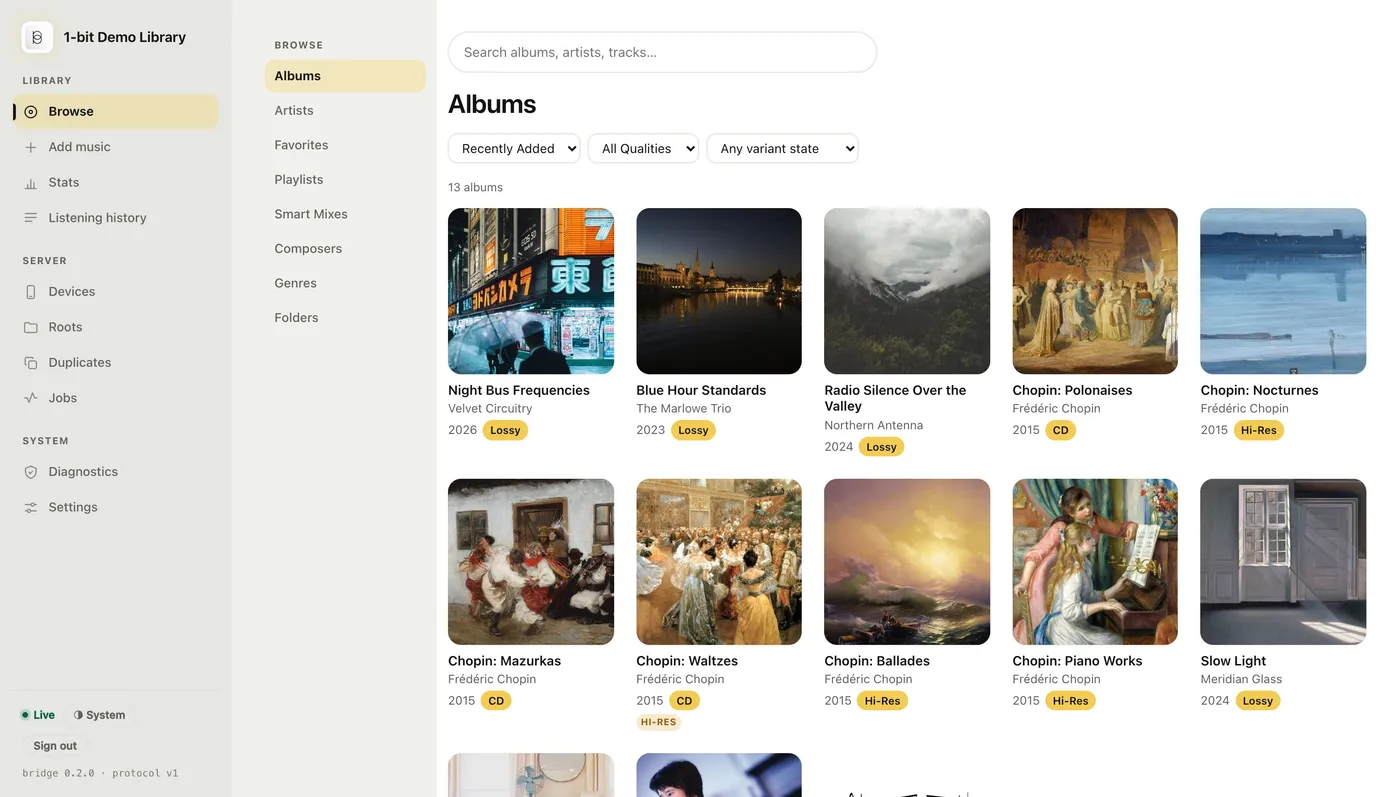
- Eight ways in. Albums, Artists, Favorites, Playlists, Smart Mixes, Composers, Genres and Folders — the same axes as the app, computed with the same normaliser, so an album is one album here and on the phone. Folders is the directory walk, for anyone who thinks in paths.
- Search. The search box reads the bridge's full-text index — the one
GET /v1/searchserves — so results come back in milliseconds on a library of tens of thousands of tracks: albums and artists first, then tracks. - Play, queue, download. An album opens to its tracks with play, shuffle and add-to-queue and a persistent now-playing bar. Anything the browser can't decode is named rather than transcoded — download those instead.
- About and booklets. An album's About tab carries what enrichment found for the release, and a release with a cached PDF booklet links it beside the cover.
- Variants where the album is. Every tile carries a quality badge and marks for the hi-res and CarPlay variants it already has. The Variants tab reads done-of-eligible coverage per kind, generates the missing ones for that album, or deletes them; the Folders view does the same for a whole directory; and the grid's variant-state filter picks out the albums that still need one.
- Delete, recoverably. With deleting enabled, an album's toolbar gains a Delete that moves the files to the library's trash rather than unlinking them. The Roots page's Trash is where the space is actually reclaimed.
A dedicated Jobs page lists every background pass — the scanner, enrichment, analysis, fingerprinting, the lyrics tier, CarPlay pre-generation, the upscale and optimize batches with their throughput — with what it is doing right now and what failed last, so the operator can see what's actually happening rather than guessing from the iOS app's wand state.
Admin & internals
The admin console, metrics, logs, container config, and the wire protocol.
Admin console tour
In loopback-mode deployments (the default) the admin console binds http://127.0.0.1:7789/ with no login — anyone with a shell on this machine already has filesystem access to the token store, so adding a password would be theatre. In public-mode deployments the admin console binds a routable HTTPS interface and requires a password login; the rest of the console works the same way.
Modern-minimal, phone-first. The console is a modern-minimal design with a light / dark / system theme toggle and a mobile-first layout — a genuinely phone-first console, which matters because a phone is usually where you are when you notice something's off with the library. Server-Sent-Events tiles stream live updates in place of polling across the Stats, Jobs and Settings pages.
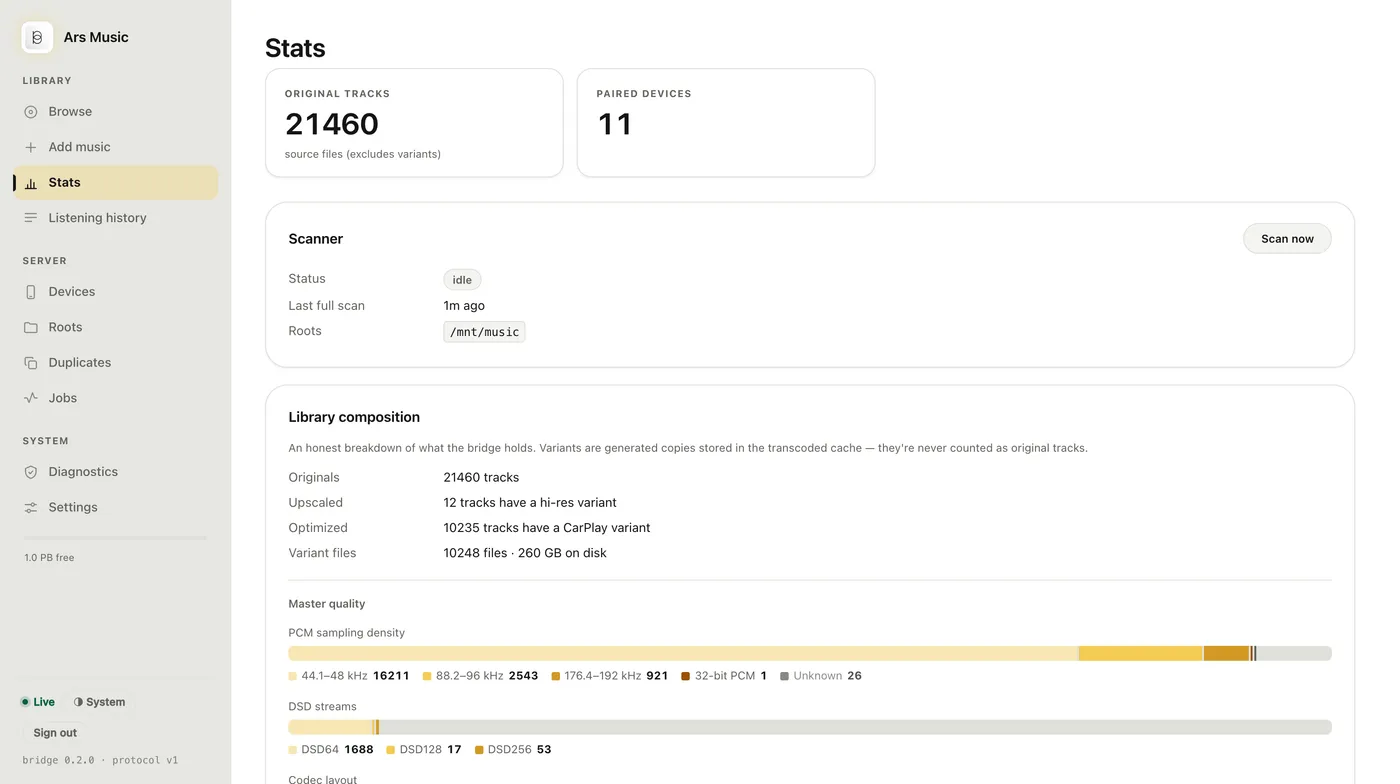
Diagnostics, Duplicates and Jobs. Diagnostics is its own page — run the preflight checks in the browser, read the log-level counts, and export a log or a redacted bug-report bundle. Duplicates shows every duplicate group, the evidence behind it, and which copy is being served. The Jobs page is the single background-activity surface: the scanner, enrichment, analysis, fingerprinting, the lyrics tier, CarPlay pre-generation, the upscale and optimize batches with a live per-worker grid, Smart-Mix regeneration, backups and update checks, each with what it's doing right now and what failed last. The Stats page's Enrichment panel carries the miss breakdown described under metadata matching.
When part of the library is proxied from UPnP upstreams, Stats adds a Sources split — filesystem roots against each upstream. Enrichment coverage and the active metadata source are live on the same page, and a per-folder retry missing re-enriches a stalled album without a full re-crawl. The full map of the console's pages:
| Page | What it does |
|---|---|
| Browse | The player — Albums, Artists, Favorites, Playlists, Smart Mixes, Composers, Genres and Folders, with search, per-album variant coverage and generation, and booklets |
| Add music | Upload files or whole folders into a library root from the browser — resumable, scanned as they land |
| Stats | Original tracks and paired devices, the scanner (status, last full scan, roots, Scan now), the library composition — originals, variants on disk, master quality by PCM sampling density, DSD stream rate and codec — the Enrichment panel with its miss breakdown, harmonic coverage, and a Sources split when UPnP upstreams are in the mix |
| Listening history | Opt-in listening history pooled across your paired devices — what gets played, recent plays, a per-device filter, export as JSON or CSV |
| Devices | Approve admin-approval pair requests, pair a new device by QR or code, rotate / revoke / rename per-device tokens, and in public mode sign every other browser out of the console |
| Roots | Add / remove library folders, the trash that deleting fills and where its space is reclaimed, and the transcoded cache — its location, its size, and a clear-all |
| Duplicates | The serving policy, every group by evidence tier, and which copy is being served |
| Jobs | Every background pass — scanner, enrichment, analysis, fingerprinting, the lyrics tier, CarPlay pre-generation, duplicate serving, Smart Mixes, backups, update checks, the upscale / optimize batches and their throughput — with last-error strings |
| UPnP | Configured and LAN-discovered upstream servers, plus manual entry; LAN deployments only |
| Diagnostics | Preflight checks run in the browser, storage and retention, the enrichment cache, the conversion pool, Tailscale, log-level counts, log export and the redacted bug-report bundle |
| Settings | One long form with a jump list — Library, Metadata (the enrichment source, fingerprinting + the AcoustID key), Audio (upscale, CarPlay optimize, analysis, Smart Mixes), Access (Tailscale, HTTP/3, DLNA, public mode), Updates (auto-install + quiet hours), Backups (snapshot schedule, retention), Status (reachable endpoints, the TLS fingerprint) |
A few things stay CLI-only by design: restore-from-snapshot (see Backups) and TLS cert rotation, because the operator-restart step has no safe web equivalent — clicking Rotate cert in a browser would orphan the very session that issued the click.
Settings apply on save. Cadences, the feature gates (upscale, analysis, Smart Mixes, CarPlay optimize, the lyrics tier), enrichment endpoints and the variants directory take effect when you save, and the response says per field what happened — a handful of listener- and boot-bound settings (the two addresses, the library watcher, Atlas, DLNA) honestly answer restart. When a change cannot take effect on this bridge — a sweeper that isn't wired, a toolchain that's missing — the console says that too.
Logs
The bridge writes structured logs to your platform's service manager:
| Platform | How to view |
|---|---|
| macOS (launchd) | log show --predicate 'subsystem == "com.acoseac.bridge"' --last 1h |
| Linux (systemd) | journalctl --user -u 1-bit-bridge -f |
| Windows Service | %PROGRAMDATA%\1-bit-bridge\bridge.log |
| Manual run | stdout / stderr of the bridge serve process |
What's deliberately not logged: bearer tokens (raw or hashed), full HTTP request bodies, and contents of MusicBrainz / Deezer / iTunes lookups.
What is logged in error paths: the paths of files that failed a scan / upscale / read, so the operator can act on the failure — mostly library-relative (e.g. music/Diana Krall/Live in Paris/01.flac, no /Users/... prefix), though some scanner and tag-reader errors name the file by its absolute path. A few informational lines, such as a track the metadata lookup could not match, name a track library-relative too. Either way the path contains artist / album / track names by typical folder layout, so if you handle these logs, treat them with the same care as the library metadata itself. Privacy → logs lists every place a path appears.
Client IP addresses are not logged in loopback-mode deployments (from bridge version 0.2.1 that includes the web server's lines about a failed connection, which earlier versions logged with the client's address). In public-mode deployments, the admin login handler logs the client IP alongside the attempted username on failed login or rate-limit refusal — this is necessary so the operator can investigate brute-force attempts. See privacy → logs for the full breakdown.
Diagnostics & bug reports
The console's Diagnostics tab is where you look when something feels wrong and you'd rather not open a terminal. It runs the same preflight checks as bridge doctor — ports, paths, permissions, the audio and fingerprint toolchains, the log's own size — in the browser, and it counts log events by level so a spike is visible without tailing anything.
Exporting a log. Pick a level and a time window and download it. "Warnings" means warnings and errors, not warnings alone — an export that quietly dropped the worst events would be the one you'd attach to a bug report. Only a service install redirects the bridge's output to a file, so a bridge run in the foreground says so rather than offering a button that can't work, and a container points you at docker logs.
The bug-report bundle packages the log together with the version, platform, config shape, and preflight results — and is redacted by default, because unlike a log you read yourself, a bundle exists to be sent somewhere. Redaction covers every section, not just the log lines: absolute paths are replaced wherever they appear, including inside the preflight output. The plain log export defaults the other way, since you're reading your own machine's paths on your own loopback console.
An oversized log is now a warning of its own — the bridge doesn't own the file (your service manager does), so it names the condition and points at newsyslog / logrotate / a scheduled task rather than rotating something out from under the writer.
Observability
Two complementary surfaces for monitoring a running bridge — both counter-only, both safe to scrape periodically.
GET /metrics— Prometheus exposition on the admin listener- Standard Prometheus text format. Counters for HTTP requests, SQLite lock-wait quantiles, upscale pool depth, manifest-builder time-on-disk, log-event counts by level, MusicBrainz cache hit ratio, Tailscale peer counts. Loopback-only in loopback-mode deployments; session-authenticated in public mode (same gate as the rest of the admin console). Point a local Prometheus / Grafana Alloy / VictoriaMetrics at it; no separate sidecar is required.
GET /v1/diagnostics— paired-iOS-visible counter snapshot- JSON payload with the same flavour of counters, served on the iOS-facing API behind the standard bearer-token auth. The iOS app's Diagnostics view consumes this so users on a paired device can see whether the bridge is healthy without needing to open the admin console. Counters and structured state only — no log text, no file paths, no IPs. Including recent log lines would force per-line privacy redaction and risk leaking PII into iOS-side diagnostic snapshots the operator might paste into a public issue.
Neither endpoint is part of the wire protocol the iOS app's core sync flow depends on; both are advertised as feature flags inside the features field of GET /v1/health so older iOS builds simply ignore them.
Container & headless deployments
The bridge runs cleanly under Docker, on a Synology / TrueNAS / Unraid box, or on any headless Linux host. It's a one-command container: the image bundles the sox / ffmpeg audio toolchain and self-initialises on first boot (serve --init-if-missing writes a default config if none exists), so docker run or docker compose up gets you a scanning bridge with no separate bridge init step. Most bridge.yaml knobs also have an environment-variable equivalent for cases where editing YAML inside a container is awkward.
Precedence. Env wins over YAML; YAML wins over hardcoded defaults.
| Env var | YAML key | Effect |
|---|---|---|
BRIDGE_LISTEN_ADDRESS | listenAddress | HTTPS listener (default :7788) |
BRIDGE_ADMIN_ADDRESS | adminAddress | Admin console listener (default 127.0.0.1:7789) — must stay loopback in loopback mode; only public mode allows a routable bind |
BRIDGE_DATA_DIR | dataDir | Where config, manifest, tokens, artwork, backups live |
BRIDGE_LIBRARY_NAME | libraryName | Display name shown in the iOS app's Sources list |
BRIDGE_LIBRARY_ROOTS | libraryRoots | Colon-separated list of music-library folders (e.g. /music:/audiobooks) |
BRIDGE_UPSCALE_ENABLED | upscale.enabled | Turn on offline PCM upscaling / CarPlay-optimize (uses the bundled toolchain). Off by default |
BRIDGE_ANALYSIS_ENABLED | analysis.enabled | Turn on waveform / loudness / key-tempo analysis and file provenance. Off by default |
BRIDGE_FINGERPRINT_ENABLED | fingerprint.enabled | Turn on acoustic fingerprinting; pair with ACOUSTID_API_KEY. Off by default |
BRIDGE_UPSCALE_DSD_RENDER_ENABLED | upscale.dsdRender.enabled | Turn on DSD → PCM renditions (needs an ffmpeg with the dsd_* decoders; the image has one). Off by default |
BRIDGE_UPLOAD_ENABLED | upload.enabled | Turn on browser uploads into the library. Off by default |
BRIDGE_LIBRARY_ALLOW_DELETE | library.allowDelete | Allow delete-as-trash from the console. Off by default |
BRIDGE_ATLAS_LYRICS_ENABLED | atlas.lyricsEnabled | Turn on the network lyrics tier (rides the Atlas harvest credential). Off by default |
BRIDGE_DISABLE_HTTP3 | disableHttp3 | Set true to bypass the UDP (HTTP/3) listeners on a host whose firewall blocks inbound UDP |
TS_AUTHKEY | tailscale.authKey | Pre-baked Tailscale auth key for unattended tsnet mode boot |
For the full container recipe — the one-command quickstart, docker-compose examples, the bundled audio toolchain, in-container Tailscale (tsnet), and reverse-proxy notes for the admin console — see the Docker guide.
Protocol
Every endpoint, request shape, and error code lives in PROTOCOL.md. The wire-protocol version is currently 1; additive fields ship without a version bump, breaking changes don't. The iOS app advertises support for protocol versions in the X-Bridge-Protocol header and refuses to talk to a server it doesn't understand.
Protocol v1 has been additive throughout: every field, flag and endpoint is optional, an older app build ignores what it doesn't recognise, and no release has needed a re-pair or an app update since the protocol was frozen. Rather than guessing from a version number, the app asks the bridge what it can do — each capability is advertised in the features array of GET /v1/health, present only when the corresponding feature is wired: among them playlistBackup / playlistsCrossDevice, playbackHistory / playbackHistoryRead, smartPlaylists, waveform / loudness / keyTempo, atlasEnrichment, booklets, lyrics, dsdRender, dlnaServer / dlnaArtwork, rendererDiscovery and diagnosticsSummary.
What rides on it: Track carries composer / conductor / work / originalYear / bpm, multi-value artists joined as ; -separated strings, content markers (artworkVersion, bookletTag, lyricsTag) so the app refreshes a changed cover, booklet or lyrics document in place, and the quality scalars bandwidthHz / truePeakDB / drScore / audioMD5State / bpmEstimated — the last so a client labels a tempo "estimated" only when the bridge positively says so. A delta manifest carries deleted (paths removed since your cursor) and deltaIncomplete (fall back to a full sync); GET /v1/playlists carries deletedIds so a deleted playlist propagates instead of being resurrected. The optional X-Device-Token header carries a durable per-device identity for the per-device features. Authenticated endpoints beyond the core sync: /v1/playlists, /v1/favorites, /v1/history (+ /batch), /v1/smart-playlists and its images, /v1/waveform, /v1/spectrum, /v1/analysis/stats, /v1/booklet/{id}, /v1/lyrics, /v1/search, /v1/renderers, /v1/diagnostics and the /v1/atlas-* family; the variant classes upscale-*, optimize-*, pcm-* and optimized-dsd-*; and an upscale.complete event on the SSE stream. HTTP/3 is purely transport — the JSON shapes are identical to HTTP/2. The DLNA / UPnP MediaServer is a separate LAN-facing surface, not part of the iOS wire protocol.